Examples and recipes — from scratch vs registry
This page is a cookbook / how-to guide. Use it when you already know the basics and want a practical script to adapt to your own workflow.
This page shows the same pipeline built in two ways:
From scratch (explicit creation of every item)
Registry‑based (reuse shared items and override only what changes)
For interactive usage, see Notebooks (Marimo): notebooks.md.
Example index
Python scripts (examples/python/)
examples/python/basic_create.py: minimal end‑to‑end JSON generation.
examples/python/complex_dic_pipeline.py: from‑scratch DIC pipeline (detailed below).
examples/python/complex_dic_pipeline_registry.py: registry‑based DIC pipeline (detailed below).
examples/python/create_registry_camera.py: generate, validate, and save a new camera item directly into
registry/.examples/python/graph_r3xa.py: graph generator (Graphviz + PyVis).
examples/python/load_edit_save.py: load an existing R3XA file, edit it, and save it again.
examples/python/qi_hu_from_json_literal.py: literal Python reconstruction of the Qi Hu JSON payload.
examples/python/registry_discovery.py: list registry entries, merge one item, and save the merged result.
examples/python/registry_usage.py: minimal registry loading and override example.
examples/python/typed_dic_pipeline.py: typed/Pydantic version of the DIC pipeline.
examples/python/qi_hu_from_scratch.py: full Qi Hu case built from scratch with loops (see Qi Hu page for details).
examples/python/validate_all.py: validate all example JSON.
examples/python/validate_examples.py: quick validation of example files.
MATLAB scripts (examples/matlab/)
examples/matlab/qi_hu_from_scratch.m: Qi Hu case built from scratch using the MATLAB binding.
Data files
examples/valid_camera_list.json: minimal valid camera dataset.examples/valid_tabular_file.json: minimal valid tabular dataset.examples/artifacts/: generated outputs (JSON + graphs) from scripts.
1) From scratch
Source: examples/python/complex_dic_pipeline.py
Key ideas:
Define specimen, camera, and DIC source explicitly.
Generate file names and timestamps via loops.
Build datasets directly from those lists.
from r3xa_api import R3XAFile, unit

r3xa = R3XAFile(
    title="Open-hole tensile test with DIC",
    description="Camera acquisition + DIC processing pipeline",
    authors="R3XA API",
    date="2024-10-30",
)

specimen = r3xa.add_specimen_setting(
    title="Openhole sample",
    description="Glass-epoxy specimen",
    sizes=[
        unit(title="width", value=30.0, unit="mm", scale=1.0),
        unit(title="thickness", value=2.0, unit="mm", scale=1.0),
    ],
    patterning_technique="white background with black spray paint",
)

camera = r3xa.add_camera_source(
    title="CCD Camera",
    description="Encoding: 8-bit",
    output_components=1,
    output_dimension="surface",
    output_units=[unit(title="graylevel", value=1.0, unit="gl", scale=1.0)],
    manufacturer="Allied Vision Technologies (AVT)",
    model="Dolphin F-145B",
    image_size=[
        unit(title="width", value=1392, unit="px", scale=1.0),
        unit(title="height", value=1040, unit="px", scale=1.0),
    ],
    focal_length=unit(title="focal_length", value=25.0, unit="mm", scale=1.0),
    standoff_distance=unit(title="standoff", value=0.5, unit="m", scale=1.0),
)

num_frames = 5
image_files = [f"img_{i:04d}.tif" for i in range(num_frames)]
timestamps = [i * 0.5 for i in range(num_frames)]

images = r3xa.add_image_set_list(
    title="graylevel images",
    description="raw images from CCD camera",
    path="images/",
    file_type="image/tiff",
    data_sources=[camera["id"]],
    time_reference=unit(title="time_reference", value=0.0, unit="s", scale=1.0),
    timestamps=timestamps,
    data=image_files,
)

dic = r3xa.add_data_source(
    "data_sources/generic",
    title="DIC processing (pyxel)",
    description="2D DIC using pyxel",
    output_components=2,
    output_dimension="surface",
    output_units=[
        unit(title="ux", value=1.0, unit="mm", scale=1.0),
        unit(title="uy", value=1.0, unit="mm", scale=1.0),
    ],
    manufacturer="Pyxel",
    model="pyxel-2d",
    input_data_sets=[images["id"]],
)

dic_files = [f"dic_{i:04d}.csv" for i in range(num_frames)]

r3xa.add_image_set_list(
    title="DIC displacement fields",
    description="ux, uy per frame",
    path="dic/",
    file_type="text/csv",
    data_sources=[dic["id"]],
    time_reference=unit(title="time_reference", value=0.0, unit="s", scale=1.0),
    timestamps=timestamps,
    data=dic_files,
)
2) Registry‑based
Source: examples/python/complex_dic_pipeline_registry.py
Key ideas:
Load reusable items from
registry/Validate each item by kind
Override only what changes (IDs, experiment‑specific values)
Use
RegistryItem.merge(...)so the merge operation stays attached to the item itself
from r3xa_api import R3XAFile, Registry, unit

registry = Registry("registry")

specimen_base = registry.get_item("settings/specimen/openhole_sample")
camera_base = registry.get_item("data_sources/camera/avt_dolphin_f145b")
pyxel_base = registry.get_item("data_sources/generic/pyxel_dic_2d")

specimen = specimen_base.merge(id="set_spec_exp01")
camera = camera_base.merge(
    id="ds_cam_exp01",
    description="CCD Camera (exp01)",
    standoff_distance=unit(title="standoff", value=0.5, unit="m", scale=1.0),
)

r3xa = R3XAFile(
    title="Open-hole tensile test with DIC (registry)",
    description="Camera acquisition + DIC processing pipeline (registry-based)",
    authors="R3XA API",
    date="2024-10-30",
)

r3xa.settings.append(specimen)
r3xa.data_sources.append(camera)

num_frames = 5
image_files = [f"img_{i:04d}.tif" for i in range(num_frames)]
timestamps = [i * 0.5 for i in range(num_frames)]

images = r3xa.add_image_set_list(
    title="graylevel images",
    description="raw images from CCD camera",
    path="images/",
    file_type="image/tiff",
    data_sources=[camera["id"]],
    time_reference=unit(title="time_reference", value=0.0, unit="s", scale=1.0),
    timestamps=timestamps,
    data=image_files,
)

dic = pyxel_base.merge(
    id="ds_dic_exp01",
    input_data_sets=[images["id"]],
)
r3xa.data_sources.append(dic)

dic_files = [f"dic_{i:04d}.csv" for i in range(num_frames)]
r3xa.add_image_set_list(
    title="DIC displacement fields",
    description="ux, uy per frame",
    path="dic/",
    file_type="text/csv",
    data_sources=[dic["id"]],
    time_reference=unit(title="time_reference", value=0.0, unit="s", scale=1.0),
    timestamps=timestamps,
    data=dic_files,
)
Outputs
From scratch:
examples/artifacts/dic_pipeline.jsonRegistry‑based:
examples/artifacts/dic_pipeline_registry.json
3) Creating a new registry item
Source: examples/python/create_registry_camera.py
Key ideas:
build a single registry item with
new_item(...)bind it to a registry key with
Registry.wrap(...)validate and save it with
RegistryItem.save(...)reload it through
Registry(...).get_item(...)
This example writes:
registry/data_sources/camera/example_generated_camera.json
Reusable registry key:
data_sources/camera/example_generated_camera
Built-in registry templates worth knowing:
settings/generic/instron_5800: generic testing-machine setting template.data_sets/list/camera_images_template: minimal camera image list template.data_sets/file/tabular_timeseries_template: minimal tabular time-series file template.
4) Loading an existing file and saving it again
Source: examples/python/load_edit_save.py
Key ideas:
load a full R3XA file with
R3XAFile.load(...)update the header in place
save a validated JSON file with
save(...)
This example reads:
examples/artifacts/dic_pipeline.json
This example writes:
examples/artifacts/dic_pipeline_loaded.json
5) Discovering and merging registry items
Source: examples/python/registry_discovery.py
Key ideas:
discover available registry items with
Registry.list(...)load an existing registry item with
Registry.get_item(...)clone it with
RegistryItem.merge(...)save the merged result with
RegistryItem.save(...)
This example writes:
examples/artifacts/registry_camera_merged.json
See also:
examples/python/registry_usage.py for the smaller
load_validated(...)+get_item(...)workflow.registry/data_sets/list/camera_images_template.jsonregistry/data_sets/file/tabular_timeseries_template.jsonregistry/settings/generic/instron_5800.json
6) Typed DIC pipeline
Source: examples/python/typed_dic_pipeline.py
Key ideas:
install the optional
typedextrabuild the same DIC pipeline using generated Pydantic models
append typed objects directly into
R3XAFile
This example writes:
examples/artifacts/dic_pipeline_typed.json
7) Qi Hu from a literal JSON reconstruction
Source: examples/python/qi_hu_from_json_literal.py
Key ideas:
rebuild the Qi Hu document with explicit
add_setting(...),add_data_source(...), andadd_data_set(...)callscompare the generated file to the reference
qi_hu_from_scratch.jsonuse it as a literal baseline when validating future API changes
This example writes:
examples/artifacts/qi_hu_from_json_literal.json
DIC pipeline graph (from scratch example)
SVG (Graphviz backend):
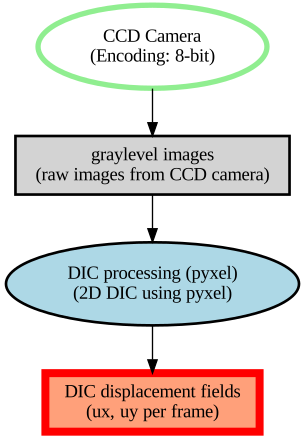
Interactive HTML (PyVis backend):