Tutorial — Qi Hu case study (IR Lagrangian thermography)
This page is a worked tutorial case study. Use it after the interactive notebook if you want to study a larger real-world R3XA pipeline.
This page documents the Qi Hu experimental case and how it maps to R3XA concepts.
Sources:
Context
The Qi Hu dataset is a complex experimental pipeline (IR + visible imaging, post‑processing, DIC‑like steps).
For more scientific context, see the Qi Hu thesis (LaMCube): https://theses.hal.science/tel-04993338.
Data flow (conceptual)
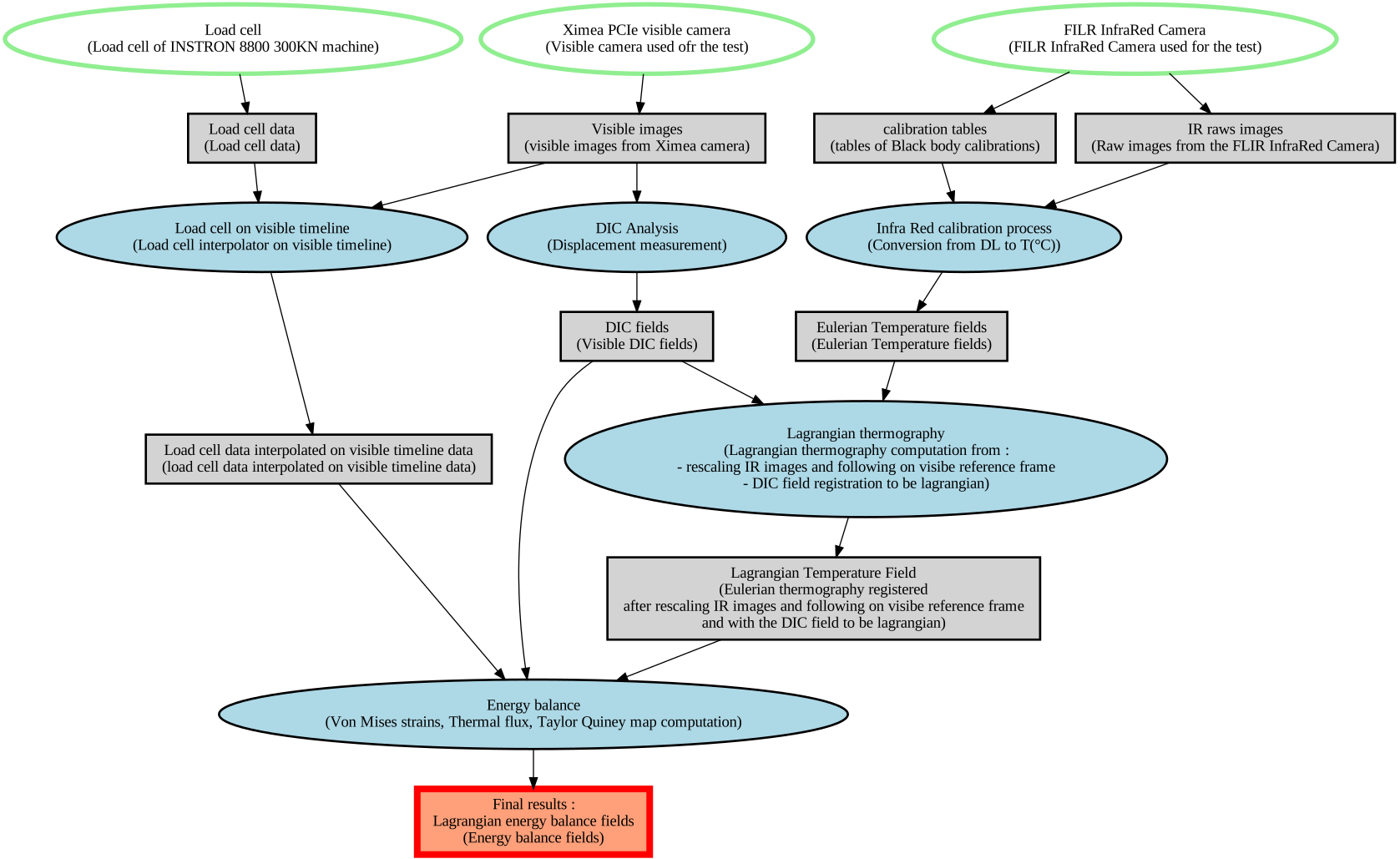
IR camera → raw images → Lagrangian thermography processing → derived fields
This is represented as a directed graph using:
data_sources(sensors / processing steps)data_sets(raw and derived data products)input_data_sets(what a source consumes)data_sources(what a dataset depends on)
Graph (Qi Hu example)
Below is the generated SVG graph for the Qi Hu case:
Below is the interactive HTML version (PyVis backend):
How to generate the graph
The Qi Hu file is built from scratch in Python (no input JSON at runtime). The script uses loops for repetitive file lists (IR frames, calibration series, time grids) so the dataset is defined compactly and remains easy to edit.
To generate the R3XA JSON from an activated .venv:
PYTHONPATH=. python examples/python/qi_hu_from_scratch.py
MATLAB users can also generate the same JSON with:
addpath(genpath('path/to/R3XA_API/matlab'));
run('path/to/R3XA_API/examples/matlab/qi_hu_from_scratch.m');
Then generate the graph:
python examples/python/graph_r3xa.py \
  --input examples/artifacts/qi_hu_from_scratch.json \
  --output docs/figures/graph_qi_from_scratch
This creates:
docs/figures/graph_qi_from_scratch.svg(Graphviz backend)docs/figures/graph_qi_from_scratch.html(PyVis backend)
Graph semantics (colors & shapes)
The graph encodes object types and data‑flow roles:
Data sources (ellipses)
Initial data sources (no
input_data_sets):Shape: ellipse
Fill: white
Border: light green
Pen width: 4
Intermediate data sources (consume datasets via
input_data_sets):Shape: ellipse
Fill: light blue
Border: black
Pen width: 2
Data sets (rectangles)
Intermediate datasets (used as input to a later source):
Shape: box
Fill: light grey
Border: black
Pen width: 2
Final datasets (not used as input later):
Shape: box
Fill: salmon
#FFA07ABorder: red
Pen width: 6
Edges
Input flow (
input_data_sets→ data_source): blackOutput flow (data_source → data_set): black
These styles are defined in examples/python/graph_r3xa.py and shared across Graphviz and PyVis.
Files used
Build script: examples/python/qi_hu_from_scratch.py
Graph tool: examples/python/graph_r3xa.py
Output SVG:
docs/figures/graph_qi_from_scratch.svg